GUIDES / SHOWROOM SAMPLE TRACKING
Showroom sample tracking software
Know where every sample is, from the day it comes in to the day it goes back to the brand.
What showroom sample tracking is
Showroom sample tracking is knowing where each sample is and what happens to it next. A sample comes in, goes on a shelf, is shown to buyers, moves to the back room and goes back to the brand. At every step someone may need to find it.
Most showrooms track samples in spreadsheets and memory. That holds until the brand sends a new sheet, a buyer asks for a style, or someone else is on shift.
Where sample time goes
How sample tracking works in Chukwu
What you can do with it
Tap one to see how it works.
- Every sample on a live map
- Look a sample up by its tag
- See what was lifted, and when
- A pull list when the sheet changes
- The history of each sample
- One map per showroom
- Plan and 3D views
- iPhone app
See the whole showroom at once
Every shelf shows what is on it, in plan and in 3D.
See Chukwu Floor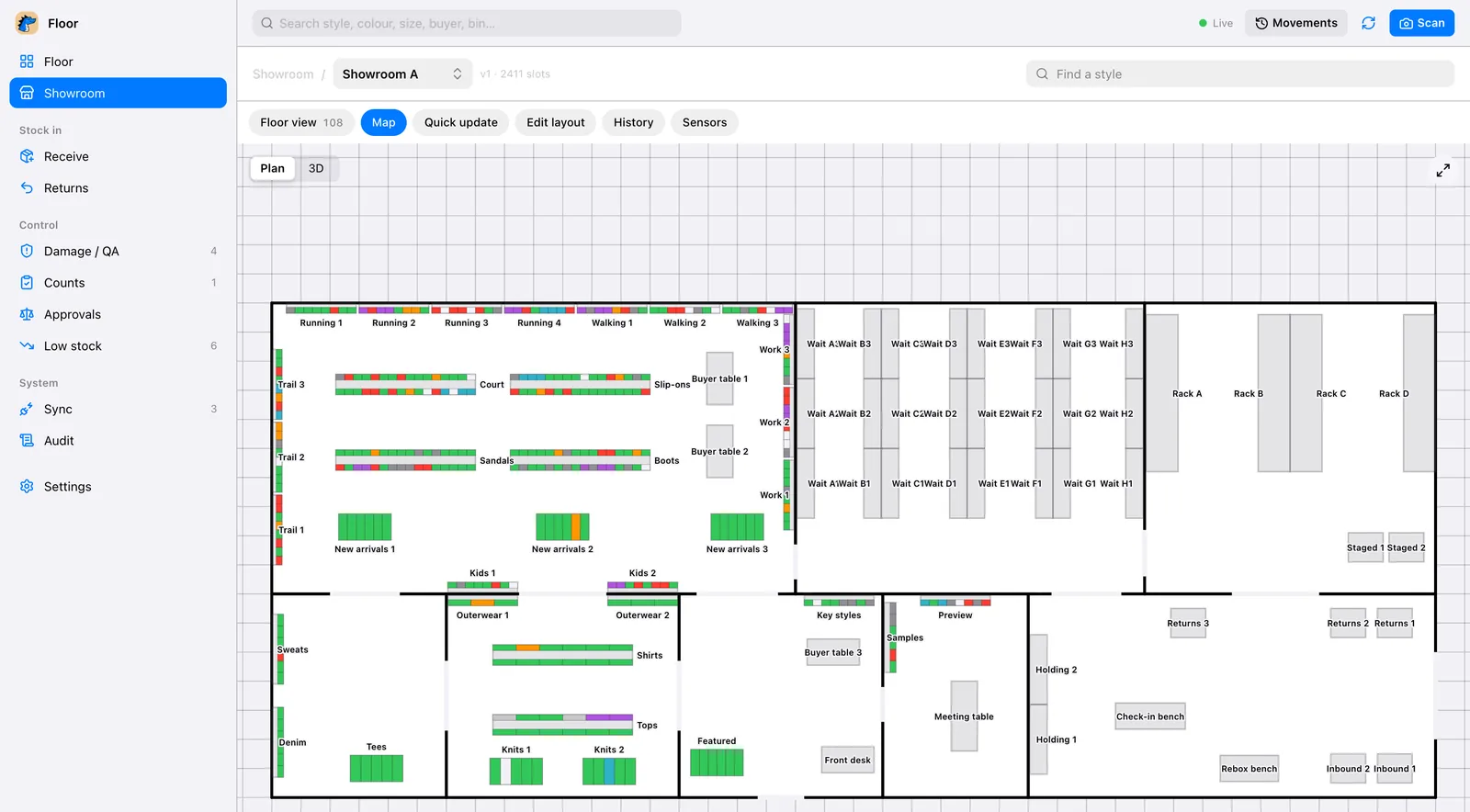
Why sample tracking breaks down
A busy showroom holds thousands of samples in a season: one for each style and colour, sometimes a run of sizes. They arrive in boxes from the brand, are checked against the line sheet, and are put out on the floor, kept in the back room or sent back.
Each of those steps happens by hand. Someone opens the box, finds the style in a spreadsheet and writes down where it went. When buyers come in, samples come off the wall, get tried and are set down somewhere else. By the end of the week the spreadsheet and the floor no longer agree.
Then the brand sends a new sheet. Styles are dropped, colours change, new samples are on the way. The only way to know what to pull is to check every sample again: the full recount most showrooms dread, and what the counting cost calculator puts a number on.
What good sample tracking software does
Use it as a checklist when you compare tools.
- Shows where every sample is now, not where it was at the last count
- Looks a sample up from its tag or its label, with no typing
- Checks new samples against the brand’s sheet as they come in
- Gives a pull list when the sheet changes, with the shelf each one is on
- Keeps samples apart from the stock you sell
- Keeps each sample’s history: in, moved, out with a rep, back to the brand
- Runs on the phones your staff already carry
- Runs more than one showroom from one account
How Chukwu tracks samples, step by step
A sample comes out of the box and the phone reads its tag or its label. Chukwu checks it against the brand’s sheet and says whether it stays, waits or goes back, then shows the shelf it belongs on in Chukwu Floor.
On the floor, each sample sits on its place on the map. With smart shelves the shelf itself reports: lift a sample and its spot turns red on every screen, put it back and it turns green. A sample taken out by a rep moves to the rep kit on the map, so nobody has to ask where it went.
When the new sheet arrives, upload it. Floor compares it with what is on the shelves and makes a pull list: only what has to come off, and the shelf each one is on. Staff pull those with Chukwu Pick on the shortest walk.
Words on this page
Plain definitions in the glossary.
Questions
What is showroom sample tracking software?
Software that records where each sample in a showroom is and what happens to it, from arrival to return. Chukwu shows it on a live map of your shelves.
Do I need special hardware?
Each sample carries a tag, and a phone reads it. The smart shelves add the live map: lift a sample and its slot turns red.
What happens when the brand’s sheet changes?
Upload the new sheet. Staff get the list of what to pull and the shelf each one sits on.
Can one account run several showrooms?
Yes. Each showroom gets its own map.
How do I start?
We map your showroom with you and tag the samples once. From then on the phone and the shelves keep track.
What if a sample has no tag yet?
Point the phone at its label. It reads the words and finds the style, with no barcode needed.
Can reps take samples out?
Yes. Move the sample to the rep kit and the map shows where it went until it comes back.
Does it replace our spreadsheets?
Yes. The brand’s sheet is uploaded, and everything else lives on the map.