MODULES / CHUKWU CORE
Every order in one queue.
Email, PDF, EDI, Shopify. Priced and checked before it ships.
Orders from every channel land in one queue. Core checks prices, flags duplicates and holds anything that needs a review. Approved orders go straight to your picking team.
Orders arrive however they are sent
Email PDFs, Excel and CSV files, JOOR, EDI 850, WhatsApp, a sales rep and Shopify all feed the same queue.
Checked before anyone ships
Each order gets the account’s pricing. Duplicates and orders that need a second look are held for approval.
From the order to the floor
Approved orders become cut tickets and picks, and Core follows each pick as it happens.
Accounts and money owed
AR aging, each buyer’s history in one view, and an export for your ERP.
How it works, step by step
What you do, what happens behind it, and the real screens.
- 01
Orders from everywhere, in one list
Shopify, JOOR, NuORDER, Faire, EDI, emailed PDFs, Excel sheets and WhatsApp all land in the same queue.
Core reads each one, even a PDF, and turns it into lines: style, colour, size and quantity.
- 02
Checked before anyone ships
Each order gets the buyer’s prices and terms. Duplicates, unknown styles and orders over a credit limit wait for a person.
You see what needs a look first, and approve the rest.
- 03
Your whole day, on one line
Today shows every order on its way from intake to cash: what came in, what is waiting, what is in Pick, what shipped and what is paid.
Pickups count down, and everything that needs you is listed in the order it hits a truck.
- 04
Straight to the floor
Approved orders become picks in Pick, or cut tickets when stock has to be made. Core follows each pick as it happens.
When a picker raises a problem, it shows up here with the buttons to fix it.
- 05
Shipped and paid
Every carrier’s price on each label, tracking to the buyer, and the invoice when it ships.
AR aging shows who owes what and how late, with each buyer’s statement a tap away.
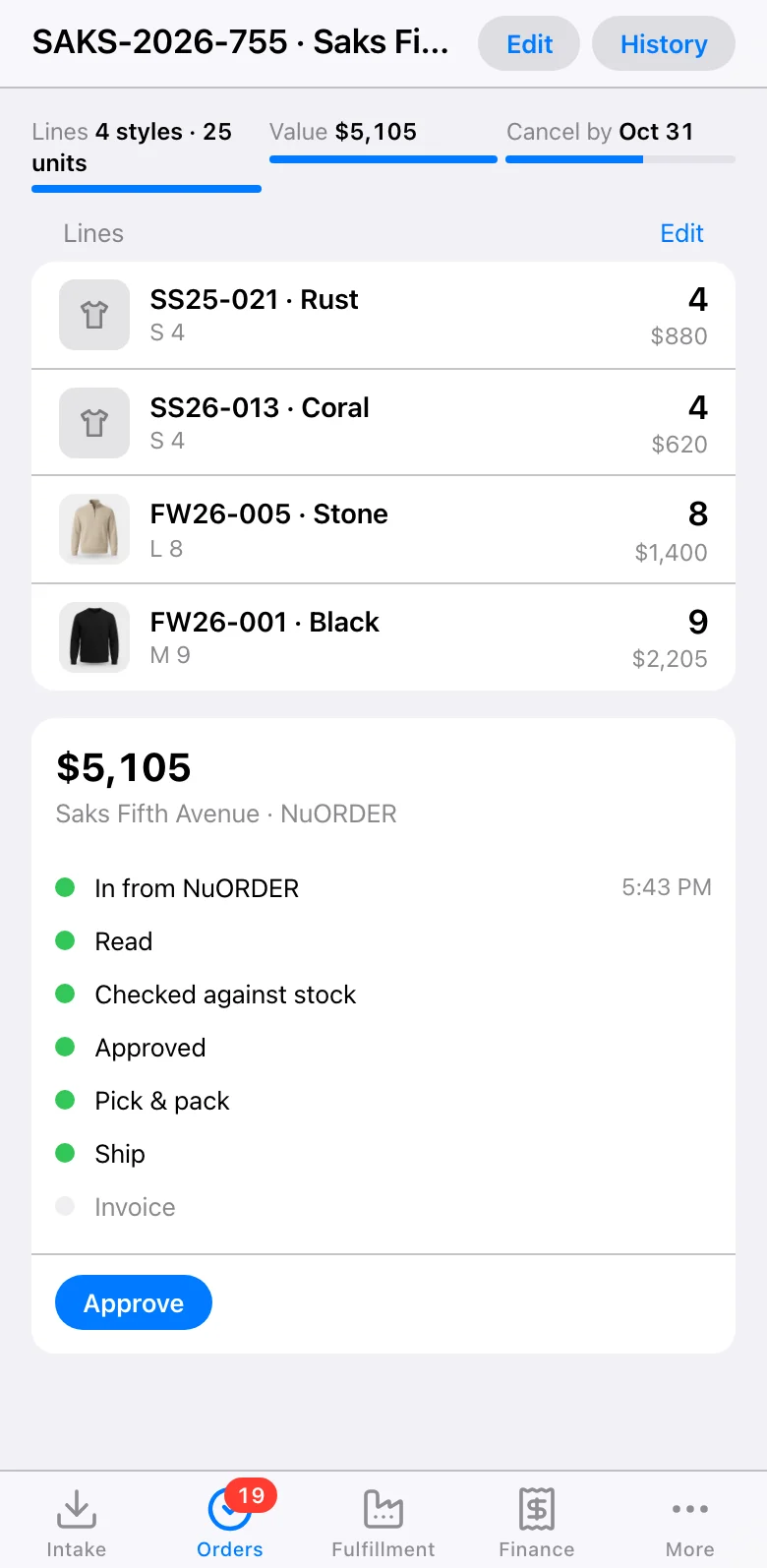
- 06
On your phone
Every order with its lines and each step from coming in to shipped, wherever you are.
Approve, hold or fix it from the phone.
Where orders come from
Every one lands in the same queue. A sales rep can add an order by hand too.




Tell us what you use. We will find a way.
Everything in Core
Tap one to see how it works.
- PDF and Excel orders
- JOOR, EDI 850, WhatsApp
- Shopify orders and stock
- Duplicate checks
- Approvals
- Cut tickets
- Pick monitor
- AR aging
- Buyer 360
- Insights
- ERP export
- Notifications
Use it as it is, or make it yours
Core works the day you turn it on. Or our team can change parts of it to fit how you work.
Tell us how you workYouText me when one of our top buyers orders.
Chukwu teamDone. Core texts you the moment their order is approved.
Questions
Which channels can orders come from?
Email PDFs, Excel and CSV files, JOOR, EDI 850, WhatsApp, a sales rep and Shopify.
What stops a duplicate order?
Core checks every order for duplicates and holds anything that needs a second look for approval.
How do orders get to the pickers?
Approved orders become cut tickets and picks, and Core follows each pick as it happens.
Does it work with my accounting?
Core keeps AR aging and each buyer’s history, and exports to your ERP.